> For the complete documentation index, see [llms.txt](https://docs.dolomite.io/llms.txt). Markdown versions of documentation pages are available by appending `.md` to page URLs; this page is available as [Markdown](https://docs.dolomite.io/integrations/gmx/glp.md).
# GLP
All about GLP, its integration with Dolomite, and what makes it special for GLP holders.
## Overview
GLP is the GMX platform's liquidity token. It consists of an index of assets used for swaps and leverage trading. It can be minted using any index asset and burnt to redeem any index asset. The price for minting and redemption is calculated based on the following formula:
`(total worth of assets in index including profits and losses of open positions) / (GLP supply)`
On Arbitrum, holders of the GLP token earn [Escrowed GMX rewards](https://gmxio.gitbook.io/gmx/rewards) and 70% of platform fees distributed in ETH. Note that the fees distributed are based on the number after deducting [referral rewards](https://gmxio.gitbook.io/gmx/referrals) and the network costs of [keepers](https://gmx-io.notion.site/gmx-io/GMX-Technical-Overview-47fc5ed832e243afb9e97e8a4a036353), keeper costs are usually around 1% of the total fees.
Staked GLP token address (Arbitrum): [0x1aDDD80E6039594eE970E5872D247bf0414C8903](https://arbiscan.io/token/0x1aDDD80E6039594eE970E5872D247bf0414C8903)
{% hint style="info" %}
The prior information was taken from GMX's [Gitbook](https://gmxio.gitbook.io/gmx/glp). If you notice any of the information is out of date or incorrect, please let us know.
{% endhint %}
### Integration with Dolomite
Dolomite's integration with the GMX ecosystem exemplifies Dolomite's modularity and positioning as a public utility for other protocols to utilize. First and foremost, Dolomite's protocol does **not** take any fees from anything earned in the GMX ecosystem, **instead passing all rewards on to the user**. This includes:
* ETH rewards
* esGMX rewards
* Multiplier points
* Vesting rewards
* Any other staking or fee-based rewards
## Depositing GLP into Dolomite
Once you have GLP in your wallet, you may deposit it into Dolomite via the `Balances` page. To deposit it, locate the plus icon *(i.e ⊕)*, to the right of GLP and the **In Wallet** column *(shown below)*.
{% hint style="warning" %}
If you want to perform a full account transfer, you must do it before depositing GLP to Dolomite. If you deposit GLP into your account first, the full account transfer feature will be permanently unavailable for the wallet you were using when you made the deposit.
Currently account transfers off of Dolomite are not supported, so only use this feature if you plan to continue to use Dolomite to accrue or redeem GMX rewards.
{% endhint %}
Note, if it is your first time depositing, you will have to unlock GLP first. Once your GLP is deposited, you will be able to interact with the GMX rewards ecosystem, the same way you would normally from GMX's web application!
{% hint style="info" %}
Depositing special assets like GLP into Dolomite results in the creation of your proxy vault. This all happens behind the scenes and occurs for each unique wallet that chooses to deposit GLP.
This proxy vault debits your Dolomite balance and gives you access to GLP virtual liquidity for use across Dolomite's various features. The proxy vault is created when you perform your first deposit or initiate a full account transfer from GMX into Dolomite.
{% endhint %}
## Compound or Claim Asset Rewards
The different rewards options can be accessed by clicking to expand the GLP row on the `Balances` page if it isn't expanded already:
Clicking on the `Asset Rewards` button will take you to the `Asset Rewards` panel (shown below), which was made to resemble the GMX *Total Rewards* panel.
The Asset Rewards panel on Dolomite
The GMX rewards interface
One change that was made to Dolomite's version of compounding or claiming rewards for the integration is allowing you to deposit the earned WETH rewards into your Dolomite account. Unchecking this box will send the rewards to your wallet instead.
To learn more about claiming and compounding, please read about it in the [GMX documentation](https://gmxio.gitbook.io/gmx/rewards#compounding-vs-claiming).
{% hint style="info" %}
The top 4 rows show you aggregate data of how much GLP, staked-GMX, and esGMX you have in your vault. This makes it convenient to see how much total GLP (or other assets) is deposited across your Dolomite Balances, borrow positions, or in any other Dolomite service.
{% endhint %}
{% hint style="success" %}
You earn GLP rewards and yield for your entire deposit on Dolomite. Even if your GLP is spread across various Dolomite services, you're still earning based on the total amount of GLP deposited in your vault.
{% endhint %}
## Stake GMX and esGMX
Staking and unstaking GMX and esGMX can be done from clicking the `Staking` button on the GLP row. Pressing the button will open the following modal:
The staking panel for GMX and esGMX
To learn how how boosting and multiplier points work, please read the corresponding section in the [GMX documentation](https://gmxio.gitbook.io/gmx/rewards#multiplier-points).
There are some minor distinctions between staking GMX and esGMX on Dolomite vs. the GMX interface. Importantly, staking GMX will require a token approval from the GMX token with your proxy vault's address set as the spender. Upon staking, the GMX tokens will be pulled from your wallet into the proxy vault and staked. No vanilla GMX tokens (tokens that are unstaked) are ever left in the proxy vault (they should always show as sbfGMX or vGMX). Any idle GMX left in the vault from claiming or unstaking is always sent to the vault owner's address (your wallet).
On the other hand, staking esGMX always pulls the tokens from your proxy vault and *never* from your wallet. Since esGMX is non-transferrable, the esGMX tokens can only ever be used in the following places:
1. Held in the proxy vault as esGMX
2. Staked from the proxy vault, which shows in the vault as sbfGMX tokens
3. Vested from the proxy vault, which shows in the vault as vGMX or vGLP tokens (more on this below)
No token approvals are needed to move esGMX into staking or vesting. Note, esGMX can *technically*, be transferred by initiating a full account transfer (more on this below).
## Vest esGMX
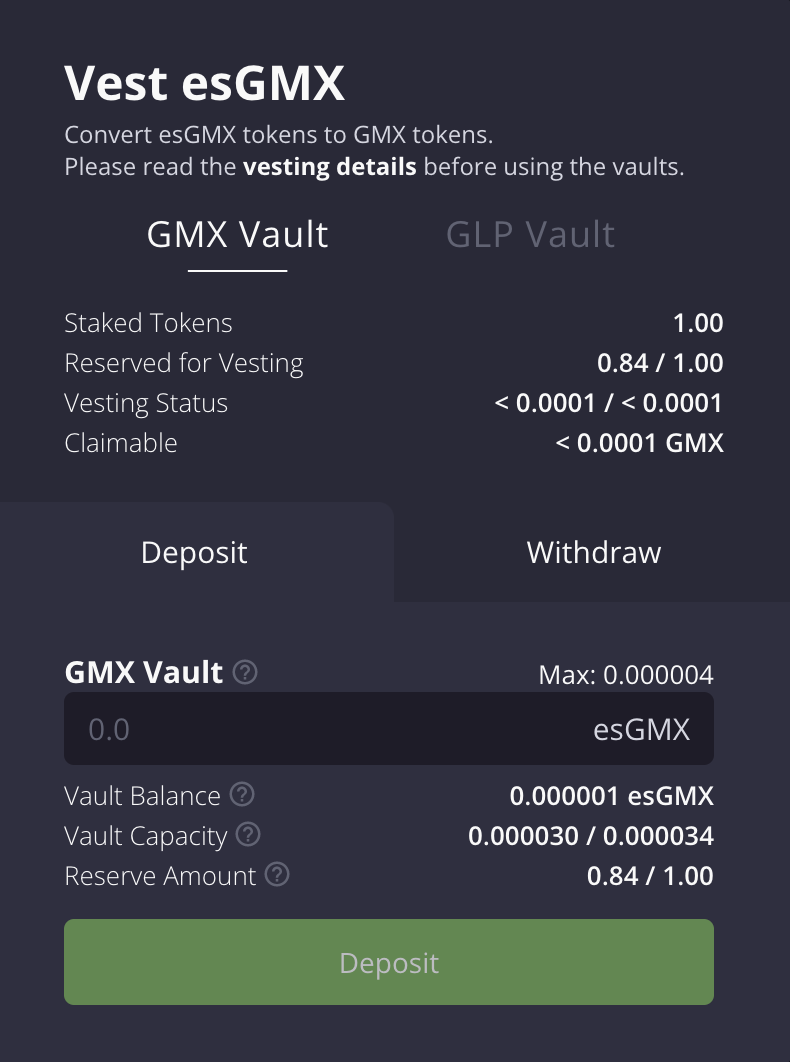
New GMX tokens are introduced into circulation by vesting esGMX into GMX tokens. By default, all esGMX you own can be converted into GMX over the course of one year by initiating the vesting process with your staked GMX or GLP tokens.
To get started, click on the `Vesting` button from the GLP row to open the following modal:
The vesting panel for converting esGMX into GMX
The mechanics for vesting esGMX into GMX work exactly the same as the GMX interface. To learn more about how vesting works, please read the following section from the [GMX documentation](https://gmxio.gitbook.io/gmx/rewards#vesting).
Importantly, any GLP tokens you use for vesting do not impact your virtual balances, borrow positions, or any other area on Dolomite that utilizes your virtual liquidity. Meaning, you can actively borrow against your GLP while you're using it to vest your esGMX into GMX without any limitations.
> Note, if your GLP gets liquidated in any position, you may be forced to unvest your GLP that's converting esGMX into GMX before it's seized by the liquidator. This should only happen if the amount of GLP held in your proxy vault is not enough to cover the debt owed against the position that is underwater.
## Full Account Transfers
Dolomite is the first protocol to offer support for full account transfers into a money market protocol. Full account transfers allow the sender to transfer all of their esGMX, staked multiplier points, GLP and staked GMX to another account while not losing any of those accumulated rewards. It's an important feature to allow long-term GMX protocol users to transfer funds while not being penalized by breaking their streak.
{% hint style="warning" %}
Full account transfers can only be executed into Dolomite once per wallet address. They cannot be performed into Dolomite if you've already deposited GLP into Dolomite for the same wallet address. If you've already deposited GLP into Dolomite for the same wallet address, you'll need to do a full account transfer into Dolomite using a different wallet address.
Dolomite does not currently support transfers out of Dolomite to external addresses but may or may not add that feature at a later time.
{% endhint %}
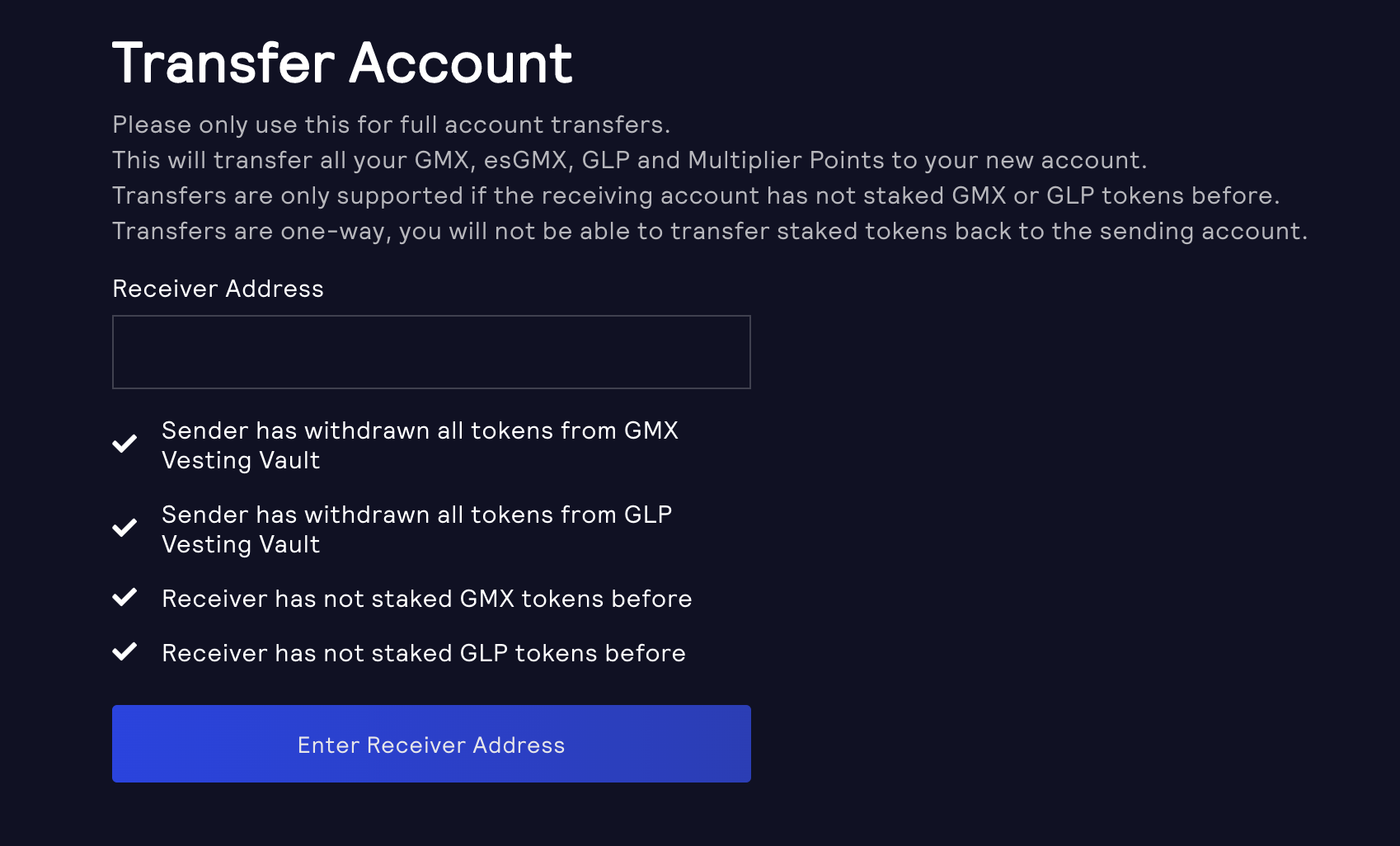
Executing a full account transfer is a two-transaction process that requires you to start on GMX's website and finish on Dolomite:
1. Click the `Transfer Account` button the GLP row to open the `Transfer Account` panel.
2. With the panel open, copy the `Receiver Address` to your clipboard. You'll need this on GMX's website.
3. On the `Transfer Account` page on GMX's website, paste the `Receiver Address` you just copied into the input field. Click `Begin Transfer` and confirm the transaction from your wallet. This is the first transaction (of 2 total).
4. Go back to Dolomite and open the `Transfer Account` panel again. Enter your wallet address as the `Sender Address`. Your wallet address can be copied to your clipboard by opening Metamask and clicking on your wallet from the top-middle toolbar of the extension .Click `Finalize Transfer` and confirm the transaction from your wallet. This is the second and final transaction.
The Transfer Account panel on Dolomite
The Transfer Account page on GMX
Please keep in mind that transferring an account requires a number of conditions to be met prior to the transfer executing. These include:
* The sender has no GMX being used to vest esGMX into GMX
* The sender has no GLP being used to vest esGMX into GMX.
* The receiver has not staked GMX tokens before
* The receiver has not staked GLP tokens before
If any condition is not met, the transfer cannot be completed. The Dolomite interface identifies which transfer requirements still need attention.
## Risk
GLP is not a borrowable asset and is permanently in [Isolation Mode](/risk-management.md#isolation-mode). You can learn more about the other risk parameters by visiting the [Risk Mitigation](/risk-management.md) page.
## Price Oracle
The GLP oracle implementation is available in the public [Dolomite Margin Modules repository](https://github.com/dolomite-exchange/dolomite-margin-modules/blob/master/packages/glp/contracts/GLPPriceOracleV1.sol). It accounts for the PnL of positions being underwritten by GMX and marks the value of the collateral using Chainlink.
Dolomite's implementation also subtracts 75 basis points from the price to reflect the cost to liquidate GLP by redeeming it for an underlying asset (most likely `USDC`).
## Liquidations
Getting liquidated for any GLP you have in a borrow position will result in the GLP you hold being seized by the liquidator and sold off using the normal collateral calculations, as explained in [Liquidations](/risk-management.md#liquidations). Importantly, only the GLP is seized though. All esGMX, staked-GMX, multiplier points, ETH rewards, etc. are kept in your vault and are never taken by the liquidator under any circumstance.
> Dolomite never takes your rewards when a complex collateral asset is liquidated. Only the collateral asset is ever taken.
## Fees
There are **no special fees** for using your GLP or GMX tokens on Dolomite. You keep 100% of the ETH rewards, multiplier points, staking rewards, esGMX, and vesting.
On a fundamental level, we believe users, institutions, and protocols that want to run their own strategies shouldn't be hampered by Dolomite cutting into their strategy's viability by taking a portion of the rewards on a protocol-level.
## Audit
All of the code specific to Dolomite's GLP vaults and the interactions with GMX's ecosystem is currently being audited by [Zokyo](https://www.zokyo.io/).